




Published June 10, 2026
by Stephen Brayton
• Updated June 10, 2026
Choosing the Right Fleet and Facility Maintenance Software: A Comprehensive Guide
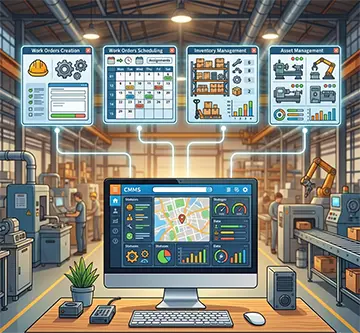
Investing in a Computerized Maintenance Management System (CMMS) marks a turning point for any asset-heavy enterprise. Organizations often reach this crossroads when spreadsheets fail, asset breakdowns spike, and compliance audits loom. Finding the right software requires a deep dive into specific selection criteria, feature comparisons, and organizational dynamics, forcing operational leaders to look past flashy sales presentations. By asking the foundational question, what should I look for when choosing a CMMS, businesses steer clear of costly implementation failures and secure a system that drives measurable operational value.
Critical Selection Criteria for Modern Assets
Alignment with Industry Operations
Every industry possesses unique maintenance workflows that a generic software package cannot support without heavy customization. A regional food processing plant, for instance, requires strict adherence to food safety standards, meaning its software must track sanitation schedules and clean-in-place procedures. Conversely, a fleet management company focuses on linear assets, fuel consumption, and DOT inspections.
When evaluating software, operations teams must verify that the platform accommodates their specific asset structures. A system built primarily for facilities management might lack the specialized fields needed to track engine hours, tire wear, or registration renewals for an over-the-road trucking fleet. Choosing a system tailored to the primary industry vertical prevents costly workarounds and ensures standard reports align with regulatory mandates.
Total Cost of Ownership and Scalability
The true expense of maintenance software extends far beyond the initial subscription fee or software license. Buyers must calculate the total cost of ownership over a five-year period. This calculation includes implementation costs, data migration fees, hardware upgrades, and recurring charges for technical support.
Scalability also determines long-term success. A manufacturing business might start by tracking assets in a single workshop but eventually expand to three regional plants. The software must accommodate additional users, multi-site configurations, and thousands of new inventory items without degrading performance or requiring a completely different tier of software.
User Adoption and Interface Simplicity
Maintenance technicians spend their days fixing machinery, not typing on computers. If the software features a clunky, confusing interface, technicians bypass it entirely, reverting to paper notes or verbal communication. A successful deployment relies heavily on front-line adoption.
During the evaluation phase, involve technicians in product demonstrations. Observe how many clicks a user needs to open a work order, log time, or search for a spare part. The system should offer an intuitive mobile interface, allowing mechanics to document work right at the machine site rather than walking back to a central desktop computer.
Maintenance software that delivers real value
MAPCON helps maintenance teams stay ahead of work orders, support better decisions, and reduce downtime.
Feature Comparisons and Core Functionality
Work Order Management and Dispatch
Work order generation serves as the engine of any maintenance department. The software must allow operators to submit service requests easily, while giving supervisors the tools to prioritize, assign, and track those tasks.
Compare how different platforms handle work order assignments. High-performing systems offer drag-and-drop scheduling calendars and automated notifications that alert technicians via mobile text or email when a high-priority task lands in their queue. Look closely at how the software logs historical comments, as this archive provides an invaluable troubleshooting resource for future breakdowns.
Preventive Maintenance Scheduling
Shifting from reactive firefighting to structured upkeep saves organizations thousands of dollars in emergency repair costs. The software must support multiple preventive maintenance scheduling methods, specifically calendar-based intervals and usage-based triggers.
Calendar-based triggers generate work orders automatically after a set period, such as an HVAC filter replacement every thirty days or an emergency eye-wash station inspection every week. Usage-based triggers rely on real-world consumption data, launching service tasks when a delivery truck hits 5,000 miles or a forklift reaches 500 operating hours. The software should automate these schedules, generating work orders weeks in advance so managers balance labor resources and order necessary parts ahead of time.
Inventory Control and Spare Parts Procurement
A lack of spare parts stalls maintenance turnarounds, while excess inventory ties up critical working capital. Effective maintenance software links inventory directly to work orders, tracking exactly where parts sit across multiple stockrooms or service trucks.
Evaluate whether the software supports automated reorder points. When a technician pulls the last drive belt from the shelf and scans it out of inventory, the software should instantly flag that item and add it to a purchase requisition draft. This functionality keeps stock levels balanced and eliminates emergency shipping expenses.
Asset Lifecycle and Historical Tracking
Every piece of equipment has a story. The platform must maintain a detailed birth-to-death record for every asset, capturing installation dates, warranty details, serial numbers, and a complete history of all completed maintenance.
This historical data helps managers make informed capital expenditure decisions. When a packaging machine repeatedly breaks down, a quick review of its cumulative repair costs versus its replacement value reveals whether the company should continue fixing the asset or finally decommission it.
Integrations and Technical Infrastructure
Enterprise Resource Planning Connections
Maintenance operations do not exist in a vacuum. A system that communicates with accounting and procurement software prevents data silos and cuts down on double data entry. For example, when the maintenance department approves a purchase requisition for a new pump, the software should transmit that data to the corporate ERP system to generate a formal purchase order.
Inquire about open Application Programming Interfaces (APIs). A platform with a flexible API enables software developers to build reliable connections between disparate operational systems, ensuring smooth data flow across the enterprise.
Data Security and Cloud Versus On-Premise Deployment
Organizations must decide between a cloud-based Software-as-a-Service (SaaS) model or a traditional on-premise installation. Cloud deployments shift the burden of server maintenance, data backups, and security patches to the software vendor, which generally suits mid-sized operations lacking large internal IT departments.
Large industrial firms or government entities might favor an on-premise deployment to keep all operational data behind their own corporate firewalls. Regardless of the deployment method, verify that the vendor complies with modern cybersecurity standards, such as SOC 2 certification, and offers role-based access control to restrict sensitive data to authorized personnel only.
Accelerate your maintenance results
Pick the next step that fits you best: start your free trial or see MAPCON live with our team.
Implementation Hurdles and Vendor Support
Data Migration and Clean-Up
Moving from legacy systems or paper records to a new digital platform presents a major challenge. The transition requires migrating vendor lists, asset registries, and preventative maintenance schedules into the new database.
A software provider should supply clear import templates and data verification tools. If an organization uploads messy, inaccurate data during setup, the new system yields poor reporting results from day one. Dedicating time to clean up asset nomenclature before import prevents long-term database confusion.
Training Programs and Ongoing Technical Support
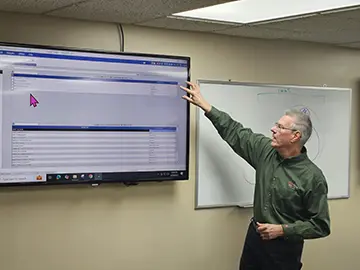 Software only delivers value if employees know how to use it. When evaluating vendors, look beyond the core feature list to inspect their training methodology. Ideal programs combine on-site training sessions for administrators with practical, hands-on workshops for field technicians.
Investigate the vendor's customer support framework. Check their standard service level agreements (SLAs) regarding response times for critical bugs. A maintenance team working a weekend shift at a distribution center cannot afford to wait until Monday morning for a technical support agent to resolve an application outage.
Driving Clear Operational Accountability
The ultimate objective of deploying a maintenance platform centers on establishing a verifiable system of record. When every breakdown, part pull, and labor hour flows through a single system, organizations eliminate finger-pointing and guesswork. Managers gain the visibility needed to evaluate team performance, track vendor warranty compliance, and justify headcount adjustments to executive leadership.
This comprehensive data capture changes the culture of the maintenance department. Technicians see exactly what tasks await them each morning, while safety coordinators easily extract the documentation needed to prove compliance during unannounced regulatory inspections. The system transforms the maintenance department from a reactive cost center into an orderly, data-driven operational unit.
Launching a Smarter Maintenance Strategy
A successful software deployment requires a balanced mix of feature analysis, team consensus, and meticulous planning. Companies that rush the selection process often end up with bloated systems that technicians abandon within six months. By systematically assessing operational workflows, involving front-line mechanics, and scrutinizing total ownership costs, leadership teams secure a platform that matches their actual daily needs.
FAQs
What factors should I look for when choosing maintenance software?
Prioritize operational alignment with your specific industry, a transparent total cost of ownership, and an intuitive mobile interface for field technicians. Systems like MAPCON offer tailored industry configurations that prevent costly system workarounds.
How does a CMMS benefit an organization's bottom line?
A CMMS reduces unplanned downtime through structured preventive maintenance and lowers capital expenditure by tracking asset lifecycles. It also controls inventory expenses by enforcing automated reorder points for critical spare parts.
What features matter most in a work order management system?
Look for platforms featuring drag-and-drop scheduling calendars, real-time mobile notifications, and detailed historical data logging. Advanced solutions like MAPCON ensure technicians receive immediate dispatch details directly on their mobile devices.
Can a CMMS integrate with our existing accounting software?
Yes, modern platforms utilize open APIs to connect with existing enterprise resource planning (ERP) and corporate accounting systems. This connection synchronizes inventory procurement and cuts down on manual double data entry.
Is a cloud-based or an on-premise system deployment better?
Cloud deployments suit organizations wanting to eliminate internal IT burdens like server management, while on-premise setups benefit secure facilities requiring complete data control. MAPCON provides both options to accommodate different corporate security strategies.
How can a company ensure high software adoption among technicians?
Involve front-line technicians during the vendor demonstration phase to evaluate the simplicity of the mobile layout. Providing tailored training programs rather than generic tutorials also builds technician confidence and software compliance.
MAPCON | 800-922-4336
Try Our CMMS Software Today!
MAPCON CMMS software empowers you to plan and execute PM tasks flawlessly, thanks to its wealth of features and customizable options. Want to see it for yourself? Click the button below to get your FREE 30-day trial of MAPCON!