




Published July 13, 2026
by Stephen Brayton
• Updated July 15, 2026
CMMS for Small Teams: How to Do More with Less Without Burning Out
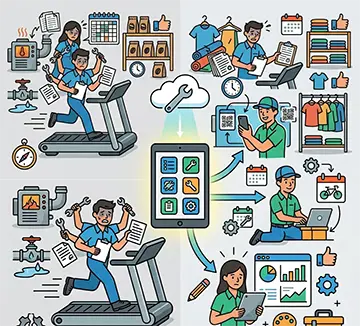 Small businesses often face a difficult balancing act. Equipment needs attention, facilities require upkeep, and maintenance tasks continue to pile up while teams remain small. This challenge leads many organizations to ask: What's the best CMMS for small businesses? The answer depends on budget, team size, and operational needs, but the best CMMS for small businesses shares several qualities. It offers simple implementation, affordable pricing, easy-to-use interfaces, and automation features that help small teams accomplish more without increasing headcount. For organizations working with limited resources, a CMMS acts as a force multiplier that reduces administrative burdens and keeps maintenance activities organized.
Why Small Teams Struggle with Maintenance Management
Large enterprises often have dedicated maintenance planners, supervisors, and technicians who focus on specific responsibilities. Small businesses rarely have that luxury. A maintenance technician at a manufacturing startup may handle equipment repairs in the morning, manage inventory after lunch, and complete compliance documentation before the end of the day. A facilities manager at a small healthcare clinic may oversee HVAC systems, coordinate contractors, and respond to emergency work requests simultaneously.
When maintenance teams wear multiple hats, important tasks can slip through the cracks. Paper work orders get misplaced. Preventive maintenance schedules become inconsistent. Equipment histories remain incomplete. Staff spend valuable time searching for information instead of completing maintenance work.
These challenges contribute directly to employee stress and operational inefficiencies. A CMMS helps address these issues by centralizing information and reducing repetitive administrative tasks.
What Makes a CMMS Ideal for Small Businesses?
Many organizations assume maintenance software only benefits large corporations. In reality, small businesses often gain significant advantages because they have fewer resources available to absorb inefficiencies.
The best CMMS for small businesses typically includes affordable subscription pricing, quick setup and implementation, mobile accessibility, automated work order management, preventive maintenance scheduling, asset tracking, inventory management, user-friendly dashboards, and minimal training requirements.
Complex software often creates additional work rather than reducing it. Small teams need solutions that support daily operations without introducing unnecessary complications.
Accelerate your maintenance results
Pick the next step that fits you best: start your free trial or see MAPCON live with our team.
Ease of Use Matters More Than Extensive Features
A maintenance platform packed with advanced functions may appear attractive during the purchasing process. However, if technicians avoid using the system because it feels confusing, the software delivers little value.
Small teams benefit most from intuitive CMMS platforms that encourage adoption across the organization. When employees can quickly create work orders, access equipment records, and update maintenance activities, data remains accurate and useful. The goal involves reducing friction, not adding another layer of administration.
CMMS for Small Teams: A Force Multiplier for Daily Operations
The phrase "do more with less" often appears in business discussions. For maintenance departments, that challenge becomes a daily reality. A CMMS supports small teams by automating routine tasks and organizing critical information in a single location.
Instead of manually tracking preventive maintenance schedules on spreadsheets, the system automatically generates work orders based on predefined intervals. Instead of searching through filing cabinets for equipment histories, technicians can access records instantly. Instead of making phone calls to assign tasks, managers can distribute work digitally and monitor progress from one dashboard.
These efficiencies save time throughout the workday.
Reducing Administrative Work
Maintenance professionals often spend a surprising amount of time handling paperwork. Work requests require documentation. Equipment repairs need records. Compliance audits demand supporting information. Inventory usage requires tracking. Without a CMMS, these responsibilities consume valuable labor hours.
Automation significantly reduces this burden. Digital workflows eliminate duplicate data entry and simplify recordkeeping. Maintenance staff can focus on completing repairs rather than managing paperwork. For small teams already stretched thin, these time savings add up quickly.
Maintenance Productivity Hacks That Deliver Real Results
Organizations frequently search for maintenance productivity hacks that generate measurable improvements without requiring major investments. A CMMS supports several practical productivity strategies.
Automate Recurring Maintenance Tasks
Preventive maintenance often falls behind when teams rely on memory or manual calendars. A CMMS automatically schedules recurring inspections, lubrication tasks, filter replacements, and equipment servicing activities. This automation reduces scheduling errors and ensures maintenance activities remain consistent.
Standardize Work Orders
Technicians frequently receive vague maintenance requests such as "machine making noise" or "air conditioner not working." Standardized work order templates help employees provide complete information from the beginning. Better information leads to faster troubleshooting and fewer delays.
Keep Asset Information in One Location
Equipment manuals, warranty information, service histories, and maintenance procedures often reside in multiple locations. A CMMS centralizes these resources. Technicians spend less time searching for documents and more time completing repairs.
Improve Communication
Communication gaps create inefficiencies across many small organizations. A centralized maintenance platform keeps everyone informed about task status, work assignments, and upcoming maintenance activities. Clear communication reduces confusion and minimizes duplicate efforts.
Maintenance software that delivers real value
MAPCON helps maintenance teams stay ahead of work orders, support better decisions, and reduce downtime.
Industry Example: Small Manufacturing Operations
Consider a small precision machining company with ten production machines and two maintenance technicians. Without a CMMS, technicians may track maintenance activities using spreadsheets and paper logs. When a machine experiences downtime, finding previous repair records becomes difficult. Preventive maintenance schedules may depend heavily on individual memory.
After implementing an affordable CMMS, the company can automatically schedule machine inspections, track repair histories, and manage spare parts inventory from a single platform. Technicians spend less time searching for information and more time keeping production equipment operational.
The result often includes reduced downtime, improved maintenance consistency, and lower administrative workload.
Industry Example: Independent Property Management Companies
Property management firms frequently operate with lean maintenance staffs responsible for multiple buildings. Work requests arrive through emails, phone calls, and text messages. Tracking repair status becomes challenging when information remains scattered across different communication channels.
A CMMS creates a centralized hub for maintenance requests. Property managers can prioritize tasks, assign work orders, and monitor completion status in real time. Tenants receive faster responses while maintenance teams gain better visibility into daily workloads.
How a CMMS Helps Prevent Employee Burnout
Employee burnout remains a growing concern across many industries. Maintenance professionals often face constant interruptions, emergency repairs, staffing shortages, and increasing workloads. These pressures contribute to stress and job dissatisfaction.
A CMMS helps reduce these challenges in several ways.
Better Workload Visibility
Managers gain a clear view of outstanding tasks, technician assignments, and maintenance priorities. This visibility helps distribute work more evenly across the team. Instead of reacting to every issue as it arises, organizations can make informed decisions about resource allocation.
Fewer Fire Drills
When preventive maintenance activities occur consistently, equipment failures become less disruptive. Teams spend less time responding to avoidable emergencies and more time handling planned work. A more organized workload creates a healthier work environment.
Reduced Mental Load
Maintenance staff often carry large amounts of information in their heads. Equipment histories, maintenance schedules, vendor contacts, and inventory levels become difficult to manage without proper systems.
A CMMS serves as a centralized knowledge repository. Employees no longer need to rely on memory for every detail. This reduction in mental burden can improve job satisfaction and reduce workplace stress.
Affordable CMMS Solutions Deliver Strong Value
Budget limitations frequently discourage small businesses from investing in maintenance software. However, many modern CMMS providers offer subscription-based pricing designed specifically for smaller organizations.
Cloud-based systems eliminate large upfront investments in servers and infrastructure. Organizations can start with essential functionality and expand usage as needs evolve.
When evaluating software options, small businesses should focus on practical value rather than feature volume.
Key questions include:
- How quickly can the team begin using the system?
- How much administrative work will automation eliminate?
- Can technicians access information from mobile devices?
- Does the software support current maintenance processes?
- Is training straightforward?
The answers often reveal which solution provides the greatest return for a small operation.
Choosing the Best CMMS for Small Businesses
The best CMMS for small businesses is rarely the most expensive or feature-heavy platform. Instead, successful implementations often involve software that aligns closely with operational realities.
Small teams benefit from systems that simplify daily maintenance activities, automate recurring administrative tasks, improve visibility across assets and work orders, support mobile access, require minimal training, and fit within existing budgets.
When maintenance teams spend less time managing paperwork and searching for information, they gain more capacity for meaningful work. That additional capacity can make a substantial difference in organizations where every employee plays multiple roles.
Building a Sustainable Maintenance Operation
Maintenance success does not depend on having the largest team or the biggest budget. Sustainable results come from creating processes that support people rather than overwhelm them.
A well-chosen CMMS helps small businesses build a maintenance culture where information remains accessible, work stays organized, and employees can focus on high-value activities instead of administrative distractions.
As staffing challenges continue across many industries, organizations that invest in practical tools today place themselves in a stronger position for long-term operational stability.
FAQS
What is the best CMMS for small businesses?
The best CMMS for small businesses offers affordable pricing, easy implementation, mobile access, and automation tools that help small teams manage maintenance more efficiently.
How can a CMMS help small maintenance teams?
A CMMS centralizes work orders, asset records, and maintenance schedules, helping small teams reduce manual tasks and stay organized with fewer resources.
Can a CMMS reduce employee burnout?
Yes. A CMMS reduces administrative workload, improves task visibility, and helps maintenance teams manage responsibilities without relying on memory or paper-based processes.
Is CMMS software affordable for small companies?
Many modern CMMS solutions offer cloud-based subscriptions with pricing designed for small businesses, making maintenance software accessible even with limited budgets.
What features should small businesses look for in a CMMS?
Small businesses should prioritize work order management, preventive maintenance scheduling, mobile access, asset tracking, inventory management, and ease of use.
Why do small teams choose MAPCON CMMS?
MAPCON CMMS provides maintenance management tools that help small teams organize work orders, track assets, manage inventory, and improve daily productivity without adding complexity.
MAPCON | 800-922-4336
Try Our CMMS Software Today!
MAPCON CMMS software empowers you to plan and execute PM tasks flawlessly, thanks to its wealth of features and customizable options. Want to see it for yourself? Click the button below to get your FREE 30-day trial of MAPCON!