




Published July 15, 2026
by Stephen Brayton
• Updated July 15, 2026
CMMS vs. Spreadsheets: A 30-Day Challenge — and Why the Spreadsheet Lost
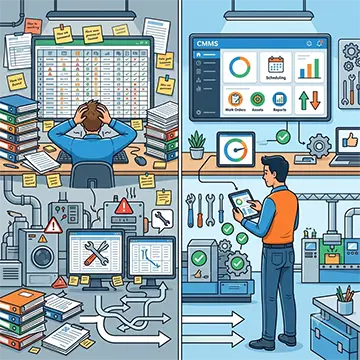 Every maintenance manager who has stared at a tangle of color-coded Excel tabs has asked the same question: Is CMMS software hard to learn? The short answer is no — not even close. This article follows a hypothetical but data-grounded 30-day trial in which a mid-sized food processing plant trades its spreadsheet maze for a modern Computerized Maintenance Management System, and the results speak plainly. By Day 30, the numbers tell a story that no pivot table ever could.
Is CMMS Software Hard to Learn? Less Than You Think.
The fear is understandable. Maintenance teams already carry full workloads. The idea of adopting new software can feel like signing up for weeks of training sessions, thick manuals, and a rocky transition that grinds productivity to a halt.
That fear, however, belongs to a different era of enterprise software. Modern CMMS platforms draw their design cues from the apps people already use every day. If a technician can navigate a smartphone, submit an expense report through an app, or order a part online, that technician can use today's CMMS tools.
Most platforms offer drag-and-drop work order creation, mobile-first dashboards, and guided setup wizards that walk users through configuration in hours, not weeks. Yes, the learning curve exists — every new tool has one — but it flattens quickly.
The real question isn't how hard CMMS software is to learn. It's how much longer a team can afford to rely on spreadsheets.
Day 1–7: The Spreadsheet Reality Check
What the Team Was Working With
At the start of the trial, the maintenance team at a hypothetical food processing plant — call it GrainPath Foods — ran all maintenance operations through a shared Excel workbook. The file contained 14 tabs, covered preventive maintenance (PM) schedules for over 200 pieces of equipment, tracked parts inventory across two facilities, and logged work orders by hand.
Three people managed this file. One senior technician functioned as the de facto "Excel keeper," spending roughly 90 minutes per day on data entry, reformatting, and fielding questions from colleagues who couldn't find what they needed. Version conflicts caused at least two scheduling errors per week. Technicians in the field had no access to the spreadsheet — they relied on printed schedules and verbal updates.
On Day 1, the team logged every manual task tied to the spreadsheet. The total: 11.4 hours per week spent managing the file itself, separate from any actual maintenance work.
The CMMS vendor provided a two-hour onboarding session for the whole team, including technicians. By the end of Day 2, the team had imported their equipment list, set up recurring PM schedules, and created their first digital work order.
Day 8–15: Side by Side
Running Both Systems in Parallel
During the second week, GrainPath Foods ran both systems simultaneously — the CMMS as the primary record and the spreadsheet as a backup. This parallel period served as a safety net and a direct comparison.
The differences surfaced fast.
When a conveyor belt motor in the grain receiving area threw a fault code on Day 9, the traditional process looked like this: a technician radioed the supervisor, the supervisor updated the spreadsheet, another technician pulled up the file on a shared desktop, and the repair history had to be manually cross-referenced across two tabs. Total time from fault to assigned work order: 47 minutes.
Through the CMMS, the same event triggered a work order from a mobile device in under three minutes. The technician on-site pulled up the asset's full service history, confirmed the correct replacement part was in inventory, and marked the job complete — all from a tablet on the plant floor. The supervisor received an automatic notification when the job closed.
By Day 15, the team had stopped looking at the spreadsheet for reference. They checked it only to verify that the CMMS matched — and it did, every time.
Maintenance software that delivers real value
MAPCON helps maintenance teams stay ahead of work orders, support better decisions, and reduce downtime.
Day 16–23: The Data Starts to Accumulate
Where CMMS Benefits Show Up in Real Numbers
The third week revealed where a CMMS earns its place most clearly: in the data it generates automatically while the team does its regular work.
The Excel workbook provided whatever the person entering data chose to record. The CMMS captured everything — labor hours by asset, parts consumption by location, mean time between failures (MTBF) for every tracked piece of equipment, and PM completion rates by technician and shift.
By Day 20, GrainPath's maintenance supervisor had a live dashboard showing that one aging grain elevator — an asset that hadn't generated complaints — was accumulating work orders at nearly twice the rate of comparable units. The spreadsheet had never surfaced this pattern because nobody had built a formula to look for it. The CMMS surfaced it automatically.
Key metrics at Day 20:
• Work order processing time: Down from 47 minutes (spreadsheet) to under 5 minutes (CMMS)
• Scheduling errors: 0 in 20 days, vs. an average of 2 per week on spreadsheets
• PM completion rate: Up from 71% to 94%
• Parts stockouts: Reduced by 40% due to automated reorder alerts
• Weekly administrative hours: Dropped from 11.4 to 3.1
These figures reflect a consistent pattern documented in industry research. A 2022 Aberdeen Group report found that companies using a CMMS achieved PM compliance rates 18% higher than those relying on manual tracking.
The math behind the improvement isn't complicated: the system does the reminding, scheduling, and logging automatically, so people don't have to.
Day 24–30: The Spreadsheet Files Its Resignation
What Full Adoption Looks Like
By the final week, no one on the team asked about the backup spreadsheet. The CMMS had become the single source of truth, and the team's habits had shifted without anyone announcing a policy change.
Technicians checked their mobile work order queues before starting a shift. The supervisor reviewed the open work order dashboard at morning standup. The parts manager checked inventory alerts instead of manually auditing bin counts.
Day 28 brought a useful stress test. A refrigeration compressor at the secondary facility tripped offline during a busy production run. Before the CMMS, this type of unplanned failure typically meant phone calls, manual searches through service records, and a trip to the parts room to physically verify stock. The downtime-to-repair clock often ran 90 minutes or more before a wrench touched the equipment.
On Day 28, the process ran differently. The work order appeared on the lead technician's phone within two minutes of the alarm. Service history loaded instantly. The parts required for the most likely failure modes appeared on-screen, with current stock levels confirmed. The technician had the right parts in hand before reaching the equipment.
Total downtime: 38 minutes — less than half the historical average.
By Day 30, GrainPath's maintenance team had closed 143 work orders through the CMMS. The Excel workbook sat untouched in a shared drive folder, last modified on Day 14.
Why Spreadsheets Lose This Fight
The Structural Limits of Excel for Maintenance
Spreadsheets solve the problem they were designed to solve: organizing data in a grid, applying formulas, and producing outputs for analysis.
For maintenance operations, they ask users to do things a spreadsheet was never designed for — manage workflows, track mobile field activity, enforce scheduling logic, and generate automatic alerts.
A spreadsheet does nothing on its own. Someone must open it, update it, and remember to check it. Every alert, reminder, and report requires manual construction. Errors multiply when multiple people share access. Version history disappears the moment someone clicks "save." Mobile access typically means a poor-fit experience on a phone or tablet.
A CMMS, by contrast, handles the logistics of maintenance management as its core function. Work orders route automatically. Schedules trigger on calendar dates or meter readings. Inventory levels generate reorder alerts. Technicians close jobs from the floor without visiting a shared computer. Every action logs itself with a timestamp.
The CMMS doesn't replace the judgment and experience of a skilled maintenance team. It removes the administrative overhead that keeps that team from doing skilled work.
Accelerate your maintenance results
Pick the next step that fits you best: start your free trial or see MAPCON live with our team.
Industries Where CMMS Adoption Changes the Game
 The food processing example illustrates the pattern, but the same 30-day shift plays out across industries.
In commercial facilities management, maintenance teams managing HVAC, electrical systems, and elevator inspections across multiple buildings use CMMS to eliminate the duplicate data entry that comes with managing compliance schedules across disconnected files.
Fleet maintenance operations — trucking companies, transit authorities, municipal vehicle pools — benefit from the CMMS's ability to tie service records directly to individual assets and trigger PM schedules by mileage or engine hours, something no Excel formula accomplishes without constant manual input.
Healthcare facilities represent another high-stakes environment. Hospital maintenance teams tracking medical equipment must meet strict regulatory inspection schedules and maintain complete audit trails. A missed PM on a ventilator or imaging system carries consequences that a dropped spreadsheet cell cannot absorb.
CMMS tools in healthcare settings reduce compliance gaps by keeping schedules visible and documented without relying on any single person to remember.
Training Requirements: Lower Than Expected
If You Can Use a Smartphone, You Can Use This One
One reason the CMMS adoption curve has flattened dramatically is that the platforms themselves have changed. Legacy CMMS products from the early 2000s often required dedicated IT resources and multi-day training programs.
Current platforms take their design cues from consumer software: clean interfaces, mobile-first layouts, and onboarding flows that guide new users step by step.
At GrainPath Foods, technicians with no prior software training beyond basic computer use reached full proficiency in core functions — opening work orders, logging labor, updating asset status — within three days. Administrative users handling scheduling, inventory, and reporting took roughly a week to feel comfortable with the full feature set.
Most CMMS vendors now provide video libraries, in-app help prompts, and live chat support as standard. Some offer sandbox environments where new users can practice without touching live data.
The training investment for a small maintenance team typically runs between four and eight hours, concentrated in the first week. That's a fraction of the time the same team spends every year maintaining a sprawling, error-prone spreadsheet.
The Real Cost of Staying With Spreadsheets
Before any CMMS conversation begins, the actual cost of the spreadsheet approach deserves a hard look.
The 11.4 administrative hours per week the GrainPath team spent managing their Excel workbook amounts to over 590 hours annually — nearly 15 full work weeks. At an average maintenance technician wage of $28 per hour, that's more than $16,500 per year spent keeping a spreadsheet running.
That figure doesn't account for the cost of scheduling errors that delay maintenance, stockouts that halt production while parts arrive, or unplanned failures that could have been caught sooner with better tracking.
Even one avoided unplanned failure per year pays for a CMMS subscription many times over.
The 30-day trial didn't just demonstrate that a CMMS produces better outcomes. It quantified how much the spreadsheet approach had been costing all along — in hours, errors, and missed opportunities to catch problems early.
Make the Move Before the Spreadsheet Makes It for You
At some point, every maintenance team that relies on spreadsheets hits a wall — a cascading scheduling failure, a compliance audit that turns up gaps, or a critical asset failure that the Excel file should have flagged weeks earlier.
That wall isn't a sign that the team failed. It's a sign that the team outgrew its tools.
The good news: the switch doesn't require a long runway, a large IT budget, or a steep learning curve. Thirty days is enough time to know.
The spreadsheet already knows how this ends.
FAQs
Is CMMS software hard to learn?
Most modern CMMS platforms are designed for everyday users, not IT specialists — if a technician can navigate a smartphone, they can handle the core functions within days. MAPCON's CMMS, for example, offers guided setup and an intuitive interface that gets teams up and running fast.
How long does it take to switch from spreadsheets to a CMMS?
Most maintenance teams reach full operational comfort with a CMMS within two to four weeks. The data migration, initial setup, and basic training often wrap up in just a few days.
What are the biggest advantages of CMMS over Excel for maintenance tracking?
A CMMS automates scheduling, work order routing, and inventory alerts — tasks that Excel requires someone to manually build and maintain. The result is fewer errors, better PM compliance, and hours of administrative time returned to the team each week.
Can small maintenance teams benefit from a CMMS?
Absolutely — small teams often see the biggest per-person impact because a CMMS eliminates the administrative burden that falls on just one or two people managing spreadsheets. MAPCON offers scalable options that fit lean teams without unnecessary complexity.
How does a CMMS reduce equipment downtime?
A CMMS keeps preventive maintenance schedules on track automatically, so fewer assets reach the point of unexpected failure. Real-time work order tracking also means faster response times when equipment does go down.
What should a team look for when choosing maintenance software?
Look for a platform with mobile access, easy work order creation, inventory management, and reporting built in — without requiring heavy IT support to maintain. MAPCON's CMMS delivers all of these in a straightforward package that maintenance professionals can manage themselves.
MAPCON | 800-922-4336
Try Our CMMS Software Today!
MAPCON CMMS software empowers you to plan and execute PM tasks flawlessly, thanks to its wealth of features and customizable options. Want to see it for yourself? Click the button below to get your FREE 30-day trial of MAPCON!