


Published August 19, 2026
by mapcon
• Updated August 19, 2026
How to Train Staff on CMMS Software
Moving Beyond Generic Dashboard Tours
 How do I train staff on CMMS software effectively? It’s the question every maintenance manager asks right after signing the contract, and the answer determines whether the system pays off or collects digital dust.
Streamline your facility management operations, reduce downtime, and empower your team with our comprehensive CMMS software solutions.
Plenty of options exist, including in-house sessions, vendor-led on-site training, and self-paced online courses. Each format has a clear place in a well-planned rollout. However, the real factor that separates a successful launch from a stalled one is whether that training centers on real maintenance work instead of a generic feature tour.
Why a Feature Tour Alone Falls Short
A dashboard walkthrough tells employees where buttons live. It doesn't tell them why those buttons matter or when to click them during an actual shift. Technicians who sit through a feature-by-feature demo often leave the session confused about how the software connects to their daily tasks. They know the interface exists, but they haven't practiced using it during a real problem.
This gap explains why so many CMMS rollouts stall after the initial excitement fades. Staff revert to paper logs, text messages, or verbal handoffs because those methods feel familiar under pressure. The fix isn't abandoning structured training programs; it's making sure whichever format a team chooses builds sessions around actual work scenarios rather than abstract navigation.
Maintenance software that delivers real value
MAPCON helps maintenance teams stay ahead of work orders, support better decisions, and reduce downtime.
Choosing a Training Format That Fits Your Team
No single delivery method works for every organization, and most successful rollouts blend more than one. Understanding what each format does well helps managers build a training plan suited to their staff, their timeline, and their budget.
- In-House Training
- On-Site Vendor-Led Training
- Online and Self-Paced Training
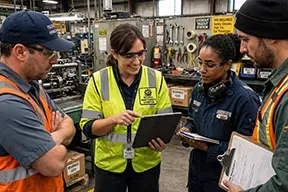 In-house training, led by an internal champion already familiar with the CMMS, gives staff a trainer who understands the plant's specific equipment, layout, and shorthand terminology. This format works well for smaller teams or for organizations that want ongoing training capacity after the initial rollout ends. An in-house trainer can also adjust sessions on the fly based on questions specific to the facility, something a generic course can't replicate.
On-site training delivered by the CMMS vendor brings deep product knowledge directly to the floor. A vendor trainer has seen dozens of rollouts across different industries and can anticipate common sticking points before they slow down adoption. This format works particularly well during initial implementation, when staff need direct access to an expert who can answer edge-case questions immediately rather than submitting a support ticket and waiting for a response.
Online training gives staff flexibility to learn at their own pace, which matters for organizations running multiple shifts or spread across several locations. New hires can complete onboarding modules before their first day on the floor, and existing staff can revisit specific lessons whenever they need a refresher. This format also scales efficiently for larger organizations that would otherwise need to repeat in-person sessions across multiple facilities.
Research published by the Association for Talent Development (ATD) shows that scenario-based learning dramatically improves knowledge retention and practical skill application compared to passive lecture formats.
The best rollouts often combine these formats: vendor-led on-site training during go-live, online modules for ongoing reference and new-hire onboarding, and in-house champions who reinforce lessons during daily work. Regardless of which combination a team chooses, the content delivered through any of these formats should follow the same principle: build sessions around how maintenance actually happens.
Train the Lifecycle, Not the Login Screen
Maintenance work follows a predictable rhythm, and training—whether delivered in-house, on-site, or online—should follow that same rhythm. Instead of teaching software in isolation, walk employees through the full sequence of a maintenance event:
- Equipment issue identified: An operator spots an operational anomaly.
- Work request submitted: Details like equipment ID and priority are captured.
- Work order assigned: A planner reviews inventory and schedules a technician.
- Repair performed: The technician follows step-by-step checklists.
- Parts & labor recorded: Usage details are logged in real time.
- Work order closed: Documentation is finalized for history tracking.
- History reviewed: Managers evaluate overall performance metrics.
Each step maps to a specific action inside the system, connecting directly to tasks employees already understand from experience. A technician doesn't need to memorize a menu structure; they need to recognize that submitting parts usage after a repair keeps inventory counts accurate for the next person who needs that same part.
A CMMS also gives every step in that sequence a timestamp and an owner, which builds accountability without requiring managers to chase down updates manually. That visibility becomes obvious to staff once they watch a request move from submission to closure in a single training session.
Train by Role, Not by Blanket Session
A single training session for every employee wastes time and buries people in features they'll never touch. Operators, planners, technicians, and managers each interact with a system differently, so their training should reflect that split. The delivery format can vary by role as well: operators might complete a short online module, while technicians benefit more from hands-on, in-house sessions using their actual devices.
Explore our tailored CMMS implementation services to help structure role-based training programs and customized workflows for your team.
Operators Submitting Requests
Operators typically spend the least time inside the software, so their training should stay narrow and practical. Show them exactly how to log an issue, what details matter (location, equipment ID, severity), and what happens after they hit submit. Skip the reporting dashboards and inventory screens entirely; those modules aren't relevant to their role and will only add noise.
Planners Scheduling Work
Planners need a deeper session focused on prioritization, technician assignment, and parts availability. Walk them through how a submitted request becomes a scheduled work order, including how the software flags conflicts like double-booked technicians or missing inventory. Planners benefit from seeing how their scheduling decisions ripple downstream to technicians and, eventually, to cost reports that managers review.
Technicians Completing Tasks
Technicians need hands-on practice logging labor hours, recording parts consumed, and attaching notes or photos to a work order before closing it out. Mobile access matters here since most technicians won't sit at a desk to update records. This is a strong candidate for on-site or in-house training, since technicians benefit from practicing on the actual device they'll carry on the floor rather than a conference room projector.
Managers Reviewing Performance
Managers need training on reporting and historical review rather than data entry. Show them how to pull maintenance history for a specific asset, compare labor costs across technicians, and identify recurring equipment problems. This is also where the value of consistent data entry becomes clear: reports are only as reliable as the information technicians logged weeks earlier.
Accelerate your maintenance results
Pick the next step that fits you best: start your free trial or see MAPCON live with our team.
Industry Examples: Training Through Real Scenarios
Generic scenarios don't stick. Training built around situations specific to an industry—and specific to the equipment employees actually maintain—creates faster and more durable learning, whether that training happens in a classroom, on the floor, or through an online module.
Water Treatment Facility: Pump Failure and Regulatory Recordkeeping
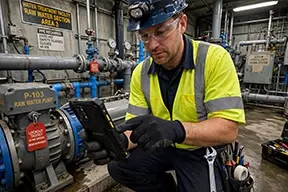 A water treatment plant runs a training session around a failed transfer pump. An operator notices reduced flow and logs a request, describing the symptom and flagging the equipment as critical. A planner reviews the request, checks parts inventory for a replacement seal, and assigns the job to an available technician. The technician performs the repair, logs labor hours, records the parts used, and attaches a photo of the completed work.
Because water treatment operations answer to regulatory bodies, the training also covers how that documentation supports compliance recordkeeping. Staff learn that closing a work order isn't just an administrative step; it's the record an inspector might request during an audit. That connection between daily task completion and regulatory accountability gives the training weight that a feature-by-feature demo never would.
Hotel Maintenance: Guest-Impact Issues Moving Through the System
A hotel maintenance department trains staff using scenarios tied directly to guest experience: a broken air conditioning unit in an occupied room, a clogged drain in a public restroom, or a malfunctioning door lock. Front desk staff submit requests the moment a guest reports a problem, and the software flags the urgency based on room occupancy status.
Technicians see the request arrive on a mobile device, head straight to the room, and close the ticket once the repair is complete. Managers later pull reports showing average resolution time for guest-impact issues, a metric that ties directly to guest satisfaction scores. Training built around this scenario shows hotel staff that software speeds up response time on problems guests actually notice.
Aerospace Manufacturing: Approval Workflows and Quality Documentation
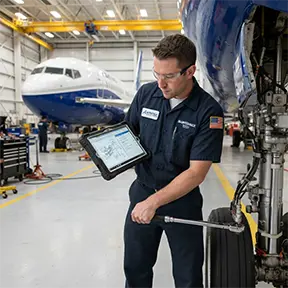 Aerospace manufacturing carries strict documentation and quality requirements, so training here focuses on approval chains and audit trails rather than speed. A training scenario might involve a maintenance event on a CNC machine used for producing certified components. An operator flags an unusual vibration, a supervisor reviews and approves the work request before it reaches a technician, and the technician documents every step of the repair with photos and detailed notes.
Staff learn that the system enforces the approval sequence automatically, preventing anyone from skipping a required sign-off. Quality managers later use that documentation to satisfy audit requirements from aerospace certification bodies. This scenario teaches aerospace employees that the software isn't just a maintenance tool; it's part of the quality system that keeps the facility certified.
Support Strategies That Reinforce Training
A single training session, no matter how well designed or delivered, won't guarantee lasting adoption. Staff need ongoing support once they start using the software on real jobs. Quick-reference guides tied to specific roles help more than a full manual nobody reads. A designated point of contact gives employees somewhere to turn when they hit an unfamiliar screen mid-shift.
For strategies on evaluating your platform's financial impact after onboarding, read our comprehensive guide on measuring the real ROI of CMMS implementation.
Refresher sessions scheduled a few weeks after go-live catch problems that only surface once employees use the system under normal workload pressure. Online modules work particularly well for these refreshers, since staff can revisit a specific lesson without pulling an entire shift into a conference room. Managers should also review usage data during this period, looking for gaps like technicians skipping the labor-hour field or operators submitting incomplete requests.
Measuring Whether Training Actually Worked
Adoption metrics tell a clearer story than attendance sheets. Track how many work orders get closed with complete documentation versus how many sit half-finished. Watch how quickly new requests move from submission to assignment; a growing backlog often signals a planner who hasn't fully absorbed the scheduling workflow. Compare data entry consistency across shifts, since gaps between day and night crews frequently trace back to uneven training coverage rather than staff skill.
Building a Maintenance Culture Around the System
Training employees works best when it stops looking like a software lesson and starts looking like a walkthrough of the job itself. Whether that lesson happens through an in-house champion, a vendor trainer standing on the shop floor, or an online module completed before a new hire's first shift, the content matters more than the delivery method.
Employees don't need to master every screen on day one; they need to see how the system fits into the repair they already know how to do. Build sessions around the equipment, the workflows, and the pressures specific to the team in the room, and the software stops feeling like an added task. It starts feeling like the way work already gets done.
FAQs
How long does it take to train staff on CMMS software?
Most employees learn core CMMS functions within a few hours when training follows real work scenarios, though full comfort with the system often builds over several weeks of regular use.
Is on-site vendor-led training worth the cost?
On-site training gives staff direct access to product experts who can answer facility-specific questions immediately, which often speeds up adoption during the critical first weeks after go-live.
Can online CMMS training replace in-person sessions?
Online training works well for flexible, self-paced learning and new-hire onboarding, though many organizations still pair it with in-house or on-site sessions for hands-on roles like technicians.
How does MAPCON support customers during CMMS onboarding?
MAPCON offers on-site and online training options along with ongoing support resources, so organizations can choose the format that fits their team and timeline.
What's the best way to train new hires on a CMMS?
Pair new hires with an experienced technician during their first few work orders, and supplement that hands-on practice with online modules they can revisit as needed.
Do all employees need the same level of CMMS training?
No, training should match each role: operators need basic request submission, technicians need work order and parts logging, and managers need reporting and history review.
MAPCON | 800-922-4336
Try Our CMMS Software Today!
MAPCON CMMS software empowers you to plan and execute PM tasks flawlessly, thanks to its wealth of features and customizable options. Want to see it for yourself? Click the button below to get your FREE 30-day trial of MAPCON!