




Published October 05, 2026
by mapcon
• Updated October 05, 2026
Customize CMMS Workflows to Build an Onboarding Engine
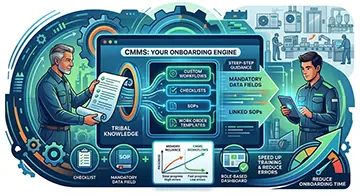 Every maintenance department faces a common hurdle: tribal knowledge leaves the building whenever an experienced technician retires or moves on. If you ask how to customize CMMS to match your workflow, the answer changes how your facility handles that turnover. Configuring software around your actual daily operations transforms a simple database into a step-by-step training engine. This approach keeps institutional knowledge intact while guiding new hires through complex tasks from day one.
Stop Relying on Memory: Turn Custom Workflows into Onboarding Tools
Relying on senior technicians to pass down trade secrets verbally creates massive operational vulnerabilities. When onboarding relies on shadowing alone, new hires miss crucial steps, misinterpret procedures, and take months to reach full productivity. Customizing your maintenance management system turns tribal knowledge into documented, repeatable processes.
Instead of forcing your staff to adjust to rigid software out of the box, shape the system to reflect your team's proven methods. Standardizing steps directly inside work orders eliminates guesswork. A well-configured platform acts as a digital co-pilot, steering technicians through maintenance routines without demanding years of prior institutional experience.
When your system matches your exact shop floor practices, training stops being an abstract classroom exercise. New technicians log into the platform, open a task, and see precisely what actions to take, what tools to bring, and what safety protocols to follow. This shift turns everyday work execution into continuous, hands-on workforce development.
Core Elements of a Workflow-Driven CMMS
When you customize CMMS features to match your maintenance culture, you enforce operational consistency across every shift. By structuring these operational safeguards, management establishes clear expectations while giving technicians the exact guidance needed to execute repairs correctly.
Embedded Checklists and Step-by-Step Tasks
Generic work orders that simply say "inspect air handler" invite inconsistent results. A configured platform breaks broad assignments into granular, sequential steps. Technicians check off each item as they complete it, ensuring no one skips visual inspections, lubrication points, or clearance checks. This structure prevents shortcuts and gives junior staff clear boundaries for every assignment.
Maintenance software that delivers real value
MAPCON helps maintenance teams stay ahead of work orders, support better decisions, and reduce downtime.
Mandatory Data Fields
Incomplete records cripple historical analysis and maintenance planning. Setting mandatory fields forces technicians to input essential data—such as meter readings, parts used, cause codes, or downtime root causes—before closing a task. Enforcing data capture at the point of execution keeps information reliable and holds every team member to the same documentation standards.
Linked SOPs and Visual Manuals
Attaching standard operating procedures, safety guidelines, schematics, and equipment manuals directly to work order records removes the hassle of hunting through paper binders. A technician tackling a rare fault can open the task on a mobile device, view the precise wiring diagram, and complete the repair without tracking down a supervisor.
Structured Escalation and Approval Paths
Workflows should extend beyond individual tasks to manage communication across your entire facility. Configuring custom routing rules ensures that requests move automatically from initial log-in to supervisor review, inventory reservation, and final sign-off. Clear approval paths eliminate administrative delays and keep tasks moving smoothly through your queue.
Real-World Impact: Solving High Turnover in Commercial Property Management
Consider a commercial property management firm handling dozens of high-rise facilities across a regional district. High turnover among building engineers regularly created service gaps, leading to tenant complaints, delayed repairs, and inconsistent maintenance across properties. Senior engineers carried critical details in their heads—such as specific valve locations, seasonal HVAC adjustments, or vendor quirks for individual elevator units.
To solve this, the firm partnered with its software provider to build tailored work order templates for recurring operational challenges. When tenant HVAC complaints or elevator fault codes trigger a request, the system instantly populates a standardized task list built specifically for that asset class.
A newly hired technician assigned to a complex climate-control issue no longer needs to guess the diagnostic sequence. Opening the work order displays a precise roadmap:
- Verify thermostat calibration and check filter differential pressure.
- Inspect belt tension and verify actuator valve positions.
- Capture inlet and outlet fluid temperatures in mandatory data fields.
- Attach a photo of the completed repair before submitting the job.
Because the system guides the process, the property manager cut onboarding time for new engineers by over fifty percent. Error rates plummeted, tenant satisfaction scores jumped, and the company built a resilient operational model no longer threatened by sudden staff departures.
What Aspects Can Your Software Provider Customize?
Collaborating with an adaptable vendor allows you to tailor software features around your facility's physical realities and labor dynamics. Modern platforms offer extensive configuration options that align software functionality with your daily operations.
Tailored Form Builder Options
Every industry tracks different metrics. A food processing plant needs washdown validation fields, while a fleet maintenance shop tracks engine hours and tire tread depths. Providers help modify data entry screens, custom fields, and task forms so your staff records only what matters to your operational goals.
User Roles and Dashboard Layouts
Different positions require different visibility. Vendors can configure role-based dashboards so maintenance managers view macro-level backlogs and budget metrics, while field technicians see only their assigned work orders and safety alerts. Removing visual clutter keeps staff focused on their immediate responsibilities.
Specialized Inventory Rules and Reorder Triggers
Managing spare parts requires alignment between stockroom workflows and purchasing policies. Providers help configure reorder thresholds, kitting lists for preventive maintenance jobs, and location mapping within your storeroom. Linking inventory actions directly to work orders guarantees parts availability while reducing excess stock.
Accelerate your maintenance results
Pick the next step that fits you best: start your free trial or see MAPCON live with our team.
Automated Notifications and Task Routing
Communication gaps cause idle time and missed deadlines. Configuring automated triggers lets the system send instant notifications to specific personnel when safety-critical tasks arise, asset downtime gets logged, or work orders stall in the approval queue.
| Customization Area | Operational Benefit | Onboarding Advantage |
|---|---|---|
| Work Order Templates | Standardizes repair steps across shifts | Eliminates reliance on senior tech shadowing |
| Mandatory Data Fields | Guarantees complete asset histories | Teaches new hires required logging metrics |
| Role-Based Dashboards | Removes screen clutter for workers | Reduces training time on software navigation |
| Attached Digital SOPs | Delivers manuals directly to the job site | Provides instant answer key for complex tasks |
| Automated Routing | Prevents administrative bottlenecks | Teaches organizational approval paths early |
Operational Advantages Across the Board
 Investing in a configurable platform yields compounding dividends for your entire organization. Beyond simplifying initial training, customized workflows establish an operational framework that protects asset health and maintains high performance standards.
Customization keeps maintenance quality uniform regardless of who completes the job. When procedures live inside the software rather than in individual memory, work quality remains high across day shifts, night shifts, and weekend coverage.
Furthermore, structured data collection yields pristine historical records. Maintenance managers gain accurate visibility into mean time between failures, component wear patterns, and true labor costs. Clean data enables better capital planning, smarter spare parts purchasing, and accurate budgeting.
Most importantly, guiding technicians with clear digital instructions boosts overall wrench time. Workers spend less time searching for manuals, asking supervisors for clarification, or driving back to the shop for forgotten tools. They arrive at the asset prepared, execute the task efficiently, and move on to the next assignment.
Rethinking Workforce Readiness Through Technology
Treating software as a static repository for work records misses its greatest value. Configuring software around your operational rhythm builds a dynamic instruction manual that elevates your workforce daily. As industrial facilities face shrinking talent pools and rising technical complexity, embedded guidance transforms fresh hires into competent operators faster than traditional methods ever allowed. Customization turns software from a passive logging system into an active catalyst for shop-floor excellence.
Frequently Asked Questions
What is the best way to customize a maintenance management system for a new team?
Begin by embedding step-by-step task checklists and standard operating procedures directly into work order templates. Platforms like MAPCON allow you to tailor these workflows to guide technicians through complex repairs without relying on memory.
Can software configuration help reduce onboarding time for maintenance technicians?
Yes, structuring mandatory fields and linking visual manuals directly to assets provides immediate guidance for new hires. MAPCON CMMS helps turn daily tasks into repeatable training exercises that bring junior staff up to speed faster.
How does tailoring work order templates prevent maintenance errors?
Customized templates mandate specific data entry points and sequential action steps before a job can be closed. This enforced structure keeps processes consistent across every shift and prevents missed steps.
What software features can a provider adjust to match specific operational workflows?
Providers can customize data intake forms, role-based dashboard views, automated task routing, and inventory reorder thresholds. MAPCON offers flexible configuration options so the software adapts to your exact facility practices.
Why should a company document tribal knowledge inside their maintenance software?
Documenting routines inside the system ensures vital equipment history and repair procedures stay with the facility when senior technicians retire. It establishes an accurate, accessible knowledge base that protects operational continuity.
Is custom software configuration difficult to manage as facility needs evolve?
Modern maintenance management solutions are built to be flexible, allowing administrators to adjust task lists and user permissions as operational demands shift. MAPCON provides accessible administrative tools to update your workflows whenever necessary.
MAPCON | 800-922-4336
Try Our CMMS Software Today!
MAPCON CMMS software empowers you to plan and execute PM tasks flawlessly, thanks to its wealth of features and customizable options. Want to see it for yourself? Click the button below to get your FREE 30-day trial of MAPCON!