




Published November 11, 2026
by mapcon
• Updated November 11, 2026
Mobile CMMS vs Desktop CMMS: Role-Based Interface Guide
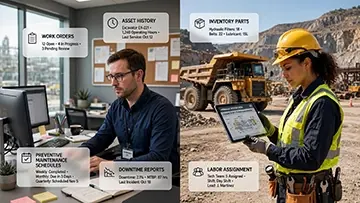 Maintenance teams often hear a familiar message: “Everyone should live in the mobile CMMS app.” However, when evaluating mobile CMMS vs desktop CMMS options, maintenance leaders need to compare actual job responsibilities rather than just devices. Instead of comparing phones and laptops, maintenance leaders need to compare job responsibilities. Different roles interact with a CMMS in very different ways, so each role naturally gravitates toward a specific interface.
When you design CMMS usage around responsibilities, adoption rises and the system starts supporting real work rather than interrupting it.
CMMS: Not One Interface for Everyone
Many articles treat mobile CMMS apps as the default home for every maintenance user. That sounds appealing, yet it ignores one reality: a technician’s world looks nothing like a planner’s world. One role stands next to hot equipment with a wrench, the other sits in front of three monitors with a backlog of work orders and shutdown plans.
A CMMS benefits both, but it does so through different experiences. The mobile app thrives in noisy, dirty, fast-paced environments where quick access to procedures, asset histories, and checklists matters. The desktop version fits quiet offices where users dig through data, shift plans around, adjust material reservations, and review long records. Treating these environments as identical leads to frustrated users and half-hearted CMMS adoption.
The better approach builds around roles and their daily tasks, then assigns a primary interface—mobile or desktop—that fits how each role works.
Role-by-Role CMMS Interface Breakdown
Different roles perform different maintenance work, so each one leans toward a particular CMMS interface. Here’s a practical breakdown:
- Technician: Mobile CMMS as primary, desktop CMMS as occasional
- Maintenance Supervisor: Both mobile and desktop as core tools
- Planner/Scheduler: Limited mobile use, desktop as primary
- Reliability Engineer: Rare mobile use, desktop as primary
- Inventory Coordinator: Sometimes mobile, desktop as primary
- Operations Manager: Occasional mobile, desktop as primary
Let’s look at why each role naturally lands in that pattern.
Accelerate your maintenance results
Pick the next step that fits you best: start your free trial or see MAPCON live with our team.
Technicians: The Field Belongs to Mobile
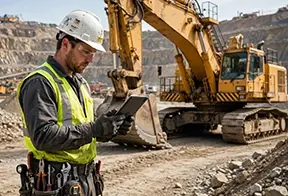 Frontline technicians stay close to assets, not desks. Their day involves climbing conveyors, walking through processing lines, crawling around pumps, and shifting between locations with little warning. A mobile CMMS app aligns with that reality.
Mobile gives technicians clear value during:
- Work order execution: Technicians open work orders at the asset, review steps, and mark tasks complete.
- Procedures and checklists: Mobile access to digital SOPs and inspection checklists replaces paper that gets lost or ruined.
- Data capture: Photos of failures, meter readings, and notes go straight into the work order while the technician stands at the equipment.
Desktop CMMS still plays a small role. Technicians might log in at the end of a shift to review upcoming work, add more detailed notes with a keyboard, or look at larger drawings. Still, the heartbeat of their CMMS interaction happens through mobile.
Industry Example: Mining Technicians on the Move
In mining operations, technicians maintain conveyors, crushers, haul truck wash stations, and dust suppression systems scattered across a large site. A rugged mobile device acts as the technician’s toolbox companion. They open the CMMS app to pull up lubrication steps for a cone crusher, record belt inspections, clock start and end times, capture photos of abnormal wear, and close work orders while standing right next to the equipment.
Back in the maintenance office, that same work order shows up with real-time field data ready for planners and supervisors. The CMMS benefits the entire team because technicians used the interface that fits their environment: mobile in the field, where desktop access simply doesn’t exist.
Maintenance Supervisors: Living in Two Worlds
Supervisors bridge the field and the office. Their day includes walking through work areas, checking with technicians, speaking with operations, and then returning to the office to review reports and schedules. They need both interfaces.
Mobile CMMS supports supervisors during:
- Field walks: They review open work orders, check status, and record quick notes or safety observations on the fly.
- Rapid approvals: They approve or reject work requests or purchase requisitions while visiting the plant floor.
Desktop CMMS supports supervisors when they:
- Review performance: They examine completion rates, backlog trends, and downtime data.
- Coordinate resources: They assign jobs, adjust priorities, and balance workloads across teams and shifts.
Supervisors succeed when they treat mobile and desktop as two sides of the same CMMS coin. Mobile keeps them connected to live activity; desktop lets them manage the bigger picture with more detail and wider context.
Planners and Schedulers: Desktop as the Control Center
Planners and schedulers rarely stand at the asset during execution. Their work hinges on planning horizons, material availability, labor capacity, and production constraints. That work fits a desktop CMMS environment far more than a mobile screen.
Desktop CMMS benefits planners through:
- Multi-screen layouts: They keep the backlog, calendar, material reservations, and labor capacity visible at the same time.
- Complex data handling: They group work orders into shutdown packages, adjust dependencies, and coordinate work with operations.
- Historical review: They dig into equipment history to understand recurring failures and schedule preventive tasks.
Mobile has limited appeal here. A planner may open a mobile app to check schedule status during a plant walk or a meeting, but the core planning work stays on the desktop. The complexity of scheduling across dozens or hundreds of assets simply demands more space and more detailed views than a phone provides.
Industry Example: Mining Shutdown Planning
In a large mine, planners prepare major crusher and conveyor shutdowns months in advance. Inside the desktop CMMS, they build job plans, assign craft hours, reserve crane time, coordinate contractor work, and align everything with the production forecast. They flip between Gantt views, material lists, and risk registers, sometimes across multiple monitors.
On shutdown day, technicians and supervisors use mobile to execute those plans and report progress from the pit, crusher stations, and conveyor galleries. The CMMS benefits both planning and execution, but through different interfaces tailored to each role’s responsibilities.
Reliability Engineers: Data Depth Requires Desktop
Reliability engineers focus on failure patterns, asset strategies, and long-term performance. They handle analytics, root cause studies, and reliability improvement projects. Their work touches CMMS data constantly, yet rarely in the field during day-to-day execution.
Desktop CMMS serves reliability engineers by:
- Providing detailed failure history: They pull long lists of work orders, filter by failure mode, and analyze repair costs.
- Supporting investigations: They review notes, attachments, and event timelines tied to specific assets and systems.
- Assisting strategy development: They adjust maintenance tactics; redesign PMs, change frequencies, and modify asset hierarchies.
Mobile CMMS only appears occasionally, such as during a field visit where they check recent history at an asset or record observations mid-inspection. The core reliability work demands desktop-level visibility and data depth, so that becomes their natural home inside the CMMS.
Maintenance software that delivers real value
MAPCON helps maintenance teams stay ahead of work orders, support better decisions, and reduce downtime.
Inventory Coordinators: Desktop First, Mobile When Needed
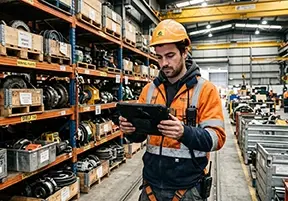 Inventory coordinators live between storerooms and CMMS screens. Their main responsibilities involve parts records, stock levels, reorder points, and vendor details. Most of that activity works best on desktop.
Desktop CMMS benefits inventory roles by:
- Managing item records: They enter item descriptions, update min/max levels, and maintain vendor information.
- Handling transactions: They review usage, post receipts, perform adjustments, and reconcile counts.
- Supporting analysis: They watch trends in parts demand and lead time, then decide which items deserve critical stock levels.
Mobile CMMS still adds value in certain cases. During cycle counts, a coordinator can carry a mobile device around the storeroom and record counts directly into the CMMS instead of writing on paper and re-keying later. In some plants, technicians use mobile to issue parts from the storeroom while inventory staff watch those movements on desktop. The CMMS benefits the flow of parts because each role uses an interface aligned with their movement and focus.
Industry Example: Mining Spares Management
In a mining operation, storerooms may sit near crushers, processing plants, and workshops. Inventory staff use desktop CMMS screens to maintain critical spare lists for conveyor gearboxes, crusher liners, and drive motors. When they walk the storeroom during cycle counts, a mobile app lets them adjust counts and flag discrepancies in real time. Desktop remains their primary view, but mobile adds agility during physical checks.
Operations Managers: Strategic Use of Desktop, Quick Glance on Mobile
Operations managers usually care about asset availability, production targets, and risk exposure. They interact with the CMMS less often than maintenance staff, but their input matters in setting priorities and accepting downtime windows.
Desktop CMMS supports operations managers when they:
- Review dashboards: They look at downtime trends, open work orders on critical assets, and backlog on production lines.
- Approve schedules: They agree to shutdown windows and negotiate timing with maintenance leadership.
Mobile CMMS offers occasional value, such as letting managers check asset status or current work on a line during a walk-through. Still, their main interaction with CMMS data happens in the office on desktop screens where they can evaluate impact and make decisions with full context.
Mining Operations: A Unified Example
Mining offers a clear view of how roles drive CMMS interface choice rather than devices dictating behavior. On a typical day:
- Technicians move across the site with rugged mobile devices, pulling up job plans and recording inspection data directly at conveyors, crushers, and mobile equipment.
- Supervisors check progress in the field on mobile, then head back to the office to adjust priorities and balance workloads via desktop.
- Planners stay at their desks, juggling shutdown schedules and work backlogs in multi-screen desktop layouts.
- Reliability engineers dig into historical CMMS data, chasing patterns behind repeated conveyor belt failures or crusher bearing issues.
- Inventory staff use desktop to manage parts for critical systems while mobile devices support physical counts in remote storerooms.
- Operations managers review desktop dashboards to understand how maintenance activity intersects with production goals and risk.
The same CMMS serves all these roles. It doesn’t succeed because everyone holds the same device. It succeeds because each role interacts with the system in the way that fits its responsibilities and environment.
CMMS Takeaway: Build Around Responsibilities, Not Devices
The most successful CMMS implementations don’t revolve around “mobile vs desktop” debates. They revolve around people and their work. When you map CMMS usage to responsibilities, something powerful happens: technicians feel the system helps them in the field, planners trust it as their planning hub, reliability engineers treat it as a data source worth mining, and supervisors use it to keep the team aligned.
A role-based approach to CMMS design prompts better questions: Which tasks demand quick field access? Which tasks depend on complex, multi-screen analysis? Which users spend most of their day away from a desk? Which users drive long-term decisions and need deep data visibility?
Answering those questions leads to clear patterns. Mobile CMMS becomes the primary tool for technicians, and a supporting tool for supervisors and certain field activities. Desktop CMMS becomes the core space for planners, reliability engineers, inventory staff, and managers. The interfaces serve the work instead of forcing the work to fit a screen.
A CMMS benefits maintenance teams most when it respects those differences. Adoption rises, data quality improves, and collaboration across roles strengthens because each user sees the system as part of their workflow—not as an extra chore.
Design CMMS Around How People Work
When maintenance leaders consider the next phase of their CMMS journey, they should resist device-first thinking. Focus on the work itself. Watch how technicians move, how planners plan, how supervisors manage, and how engineers analyze. Then shape mobile and desktop experiences that match those patterns.
That choice doesn’t just improve comfort with the software. It encourages a culture where CMMS use feels natural, where data lives close to the work that created it, and where every role finds its own path into the system. Over time, that culture supports stronger decisions and steadier equipment performance without asking anyone to change jobs just to fit a screen.
FAQs
What is the difference between a mobile CMMS and a desktop CMMS for maintenance teams?
A mobile CMMS supports field technicians with on-the-go access to work orders, while a desktop CMMS suits planners, supervisors, and engineers who manage schedules and analyze data in the office.
Which maintenance roles benefit most from a mobile CMMS app?
Technicians and supervisors benefit most from mobile apps because they spend significant time in the field and need quick access to tasks, procedures, and asset information.
Why do planners and schedulers prefer desktop CMMS interfaces?
Planners and schedulers prefer desktop CMMS because it handles complex scheduling, long backlogs, and multi-screen views that support shutdown planning and resource coordination.
How does MAPCON CMMS support different maintenance roles?
MAPCON CMMS offers both mobile and desktop interfaces so technicians, supervisors, planners, and reliability engineers can use tools tailored to their specific responsibilities.
Can managers and operations leaders use mobile CMMS tools effectively?
Yes, managers and operations leaders can use mobile tools to check asset status and open work orders, but they often rely on desktop dashboards for deeper performance insights.
Do reliability engineers need mobile CMMS access every day?
Reliability engineers rarely need mobile CMMS access daily; they rely on desktop views to study failure histories, refine strategies, and support long-term equipment performance.
MAPCON | 800-922-4336
Try Our CMMS Software Today!
MAPCON CMMS software empowers you to plan and execute PM tasks flawlessly, thanks to its wealth of features and customizable options. Want to see it for yourself? Click the button below to get your FREE 30-day trial of MAPCON!